

Creator
Tools

Description
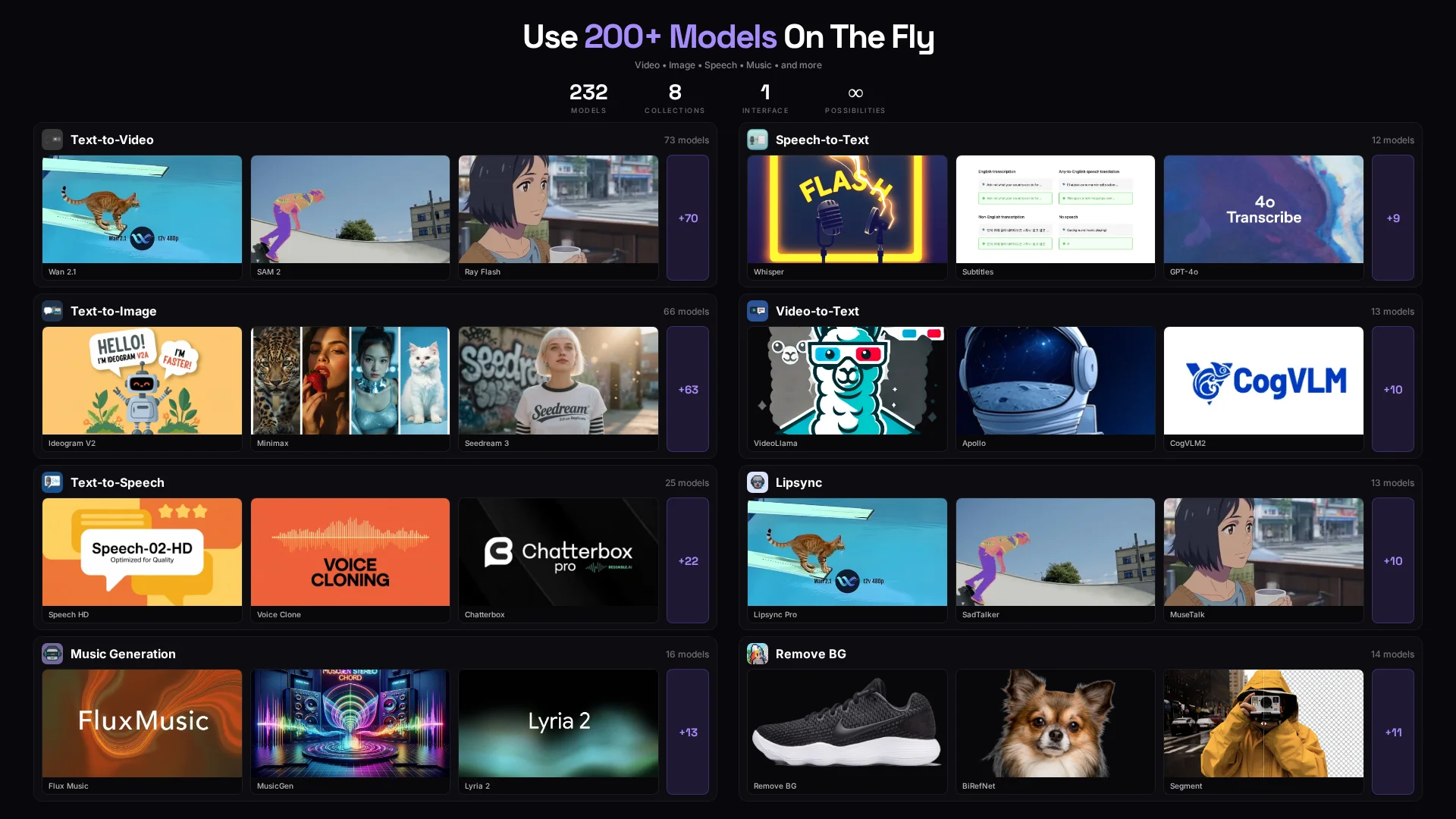
Discover and run any AI model from Replicate's 200+ models across 8 collections including video generation, image generation, speech, music, and more
Clones

Category
Example Task
Run Any AI Model, Instantly
Access 200+ Replicate models across 8 collections with natural language. No code, no configuration files—just describe what you want.
What You Get
8 AI Collections, 200+ Models
- Text-to-Video (73 models) - Veo 3.1, Seedance, Minimax
- Text-to-Image (66 models) - Flux Pro, Imagen, Stable Diffusion
- Music Generation (16 models) - MusicGen, Suno, Udio
- Text-to-Speech (25 models) - ElevenLabs, Bark, Kokoro
- Background Removal (14 models) - RMBG, BiRefNet
- Speech-to-Text (13 models) - Whisper, Faster Whisper
- Lipsync (13 models) - Wav2Lip, SadTalker
- Video-to-Text (12 models) - Gemini, LLaVA Video
Smart Discovery & Execution
- Discover Models - Search by capability, filter by collection
- Automatic Configuration - Agent reads model schemas and uses smart defaults
- Cost Transparency - See cost estimates before running
- Schema-Driven Input Collection - Only asks for required parameters
How It Works
- Describe your goal - "Generate a marketing video" or "Create product images"
- Agent recommends models - Shows top 3-5 options with tradeoffs (quality, speed, cost)
- Smart input collection - Agent uses schema to ask only what's needed
- Cost confirmation - See estimate before execution
- Results + next steps - Get output with options to iterate
Perfect For
- Content Creators - Quick access to video/image/music generation
- Marketers - Create ad creatives, social content, product demos
- Developers - Prototype AI features without SDK setup
- Agencies - Run client projects across multiple AI models
- Researchers - Experiment with cutting-edge AI models
Get Started
Clone this agent and start running AI models instantly. No setup required—just describe what you want to create.
More by Michael Shaimerden


Website Remaker Prompt Generator
 Agent •
 Easily recreate any website with the Website Remaker Prompt Generator! This AI agent analyzes a website, extracts its sitemap, brand assets (like colors, fonts, and logos), shared UI components, and gives you a detailed page-by-page breakdown. Perfect if you want to re-create your current site (or competitors') in Loveable and Claude Code Features: Enter a website URL for instant analysis Agent finds all pages and captures key screenshots Extracts brand colors, typography, and logos Identifies shared UI elements like headers and navigation Analyzes each page's structure and content Outputs a ready-to-use JSON prompt file for AI coding tools Who Is It For? Developers, designers, and entrepreneurs wanting to clone or remake sites Agencies doing competitive research Anyone building landing pages or web apps using existing sites as inspiration Turn any website into a rebuild-ready prompt in minutes!



Video Personalization Agent
Agent • Video Personalization Agent for Enterprise GTM Teams Create high-impact personalized sales and marketing videos at scale using AI. This agent automatically researches a prospect’s business, generates a tailored script, records a talking-head video using AI voice and lipsync, and delivers a ready-to-send video asset in minutes. Built for modern enterprise Go-To-Market teams that want higher reply rates, faster deal cycles, and less manual work. What This Agent Does The Video Personalization Agent automates the full workflow of creating personalized outbound and account-based marketing videos. End-to-end flow: Scrapes a prospect’s website to understand their business Captures a screenshot of a relevant page for visual context Writes a short, confident video script tailored to that business Generates AI voice audio and lip-synced talking-head video Overlays the talking-head video on the prospect’s website screenshot Saves a permanent video URL ready for outreach or campaigns The result is a personalized video that feels hand-crafted but is fully automated. Designed for Enterprise GTM Use Cases This agent is purpose-built for teams operating at scale across sales, marketing, and revenue operations. Core GTM Jobs To Be Done Personalize outbound without hiring more SDRs Increase reply rates in cold email and LinkedIn outreach Shorten sales cycles with relevant, visual explanations Scale account-based marketing across hundreds of accounts Reduce manual research and video recording time Deliver consistent messaging across global teams High-Value Use Cases AI BDR and Sales Teams Personalized video intros for outbound leads Custom account walkthroughs for enterprise prospects Deal follow-ups with visual explanations Warm handoff videos from SDR to AE Marketing and ABM Teams 1:1 landing page videos for target accounts Campaign-specific video personalization Website audits and tailored product overviews Video-based lead magnets for high-intent prospects RevOps and Growth Teams Automated video creation triggered from CRM Consistent messaging across regions and segments Faster experimentation with personalized messaging Scalable personalization without operational overhead Built-In Relevance AI Value Storytelling Each video script demonstrates how Relevance AI can help their business specifically. The agent: Explains how Relevance AI builds teams of AI agents that do real work Shows how those agents save time, reduce manual effort, and improve quality Positions AI as an operational advantage, not a demo toy Example AI Agents Highlighted in Videos Depending on the business, the script may include: AI BDR Agent for instant lead engagement and qualification AI Research Agent for fast market and account insights AI Support Agent for handling customer questions at scale AI Operations Agent for automating internal workflows All examples are tailored to the prospect’s industry and GTM motion. Script Style and Tone Excited and confident Clear and conversational language Short sentences designed for spoken delivery No complex grammar Optimized for 20 to 30 second videos Focused on real outcomes like revenue, speed, and quality Enterprise-Ready Proof Relevance AI is trusted by companies like: SafetyCulture DigitalOcean Qualified This agent helps tell that story in a way that feels personal and relevant to every prospect. Prerequisites To run this agent, you will need: An ElevenLabs voice ID and API key A face video URL used for lipsync Imagine What Your AI Workforce Could Do This agent gives prospects a clear picture of what is possible when AI agents handle real GTM work. Imagine your own custom AI agents: Engaging leads instantly Researching accounts automatically Supporting customers around the clock Executing GTM workflows without manual effort This agent helps your buyers see that future in under 30 seconds.

Lipsync Video
 Tool •
 🎬 Lipsync Video AI Agent Bring your videos to life by syncing any audio to a face video with AI-powered lip-sync! 💡 What It Does Upload a video URL with a clear face. Add your audio URL (MP3 or WAV). Pick your sync mode: loop, freeze, or bounce. The AI matches lip movements to your audio, making it look like the person is really speaking! 🔹 Features Realistic talking head videos in minutes. Multiple sync modes for creative control. Works with most video and audio formats. 🛠️ Tools That Help AI lip-sync engine for accurate mouth movement. Easy URL-based workflow—no downloads needed. 👥 Who Is This For? Perfect for content creators, marketers, and video producers who want to make engaging, custom talking head videos fast. Try Lipsync Video now and transform your footage into dynamic, talking content!
You might also like



Personal Astrology Agent
Agent • Calculates complete birth charts using Swiss Ephemeris data and provides detailed natal chart readings. Setup Required You need a Free Astrology API key to use this agent. Sign up at freeastrologyapi.com to get your free API key After installing this agent, go to the agent's Settings Find the Free Astrology API Key field and paste your API key Save the settings Features Complete birth chart calculations with all planets, asteroids, and houses Detailed natal chart interpretations Future transit predictions Zodiac compatibility analysis Psychological astrology insights How to Use Step 1: Provide your birth details Date of birth (e.g., March 15, 1990) Time of birth (e.g., 2:30pm) - the more precise, the better Place of birth (e.g., Sydney, Australia) Step 2: Get your full reading The agent will calculate your chart and present: All planetary positions with signs, degrees, and houses All 12 houses with their meanings Asteroids (Chiron, Lilith, etc.) and Lunar Nodes Element and modality balance analysis Personalized interpretations Step 3: Ask follow-up questions "What does my Venus in the 8th house mean?" "What transits are coming up for me?" "Am I compatible with a Scorpio?"

WhatsApp AI Agent
Agent • 💬 WhatsApp AI Agent – Your 24/7 WhatsApp Assistant Automate, organize, and enhance your WhatsApp conversations with smart AI! This agent instantly replies to all incoming messages with friendly, clear, and professional answers. It remembers your chat history, keeps context, and helps you plan, schedule, and organize your day. No more missed messages or forgotten follow-ups! 🔹 Key Features Instant, warm replies to every WhatsApp message. Remembers previous chats for smooth, natural conversations. Helps with planning, scheduling, and quick info lookup. Auto-saves new contacts and manages multiple chats. Retrieves chat history for context-aware responses. Sends messages, starts new chats, and personalizes replies. Respects your privacy and keeps conversations professional. 🔹 Who Is This For? Busy professionals who need help managing WhatsApp. Small business owners automating customer chats. Customer service teams for fast, friendly replies. Anyone wanting a smart chat organizer. 🔹 Tools That Help Get all chats and messages. Fetch user profiles. Start new chats and send messages. ✨ Try WhatsApp AI Agent now



Maida News Hub
Agent • Professional news curator that creates comprehensive weekly newsletters covering AI & Technology, Politics (US, Canada, Chile), Vancouver Local News, Cryptocurrency, and Key Political Figures. Performs targeted web searches, analyzes news from the last 7 days, and formats results into professional newsletter structure with clear English summaries.