

Creator
Tools






Integrations

Description
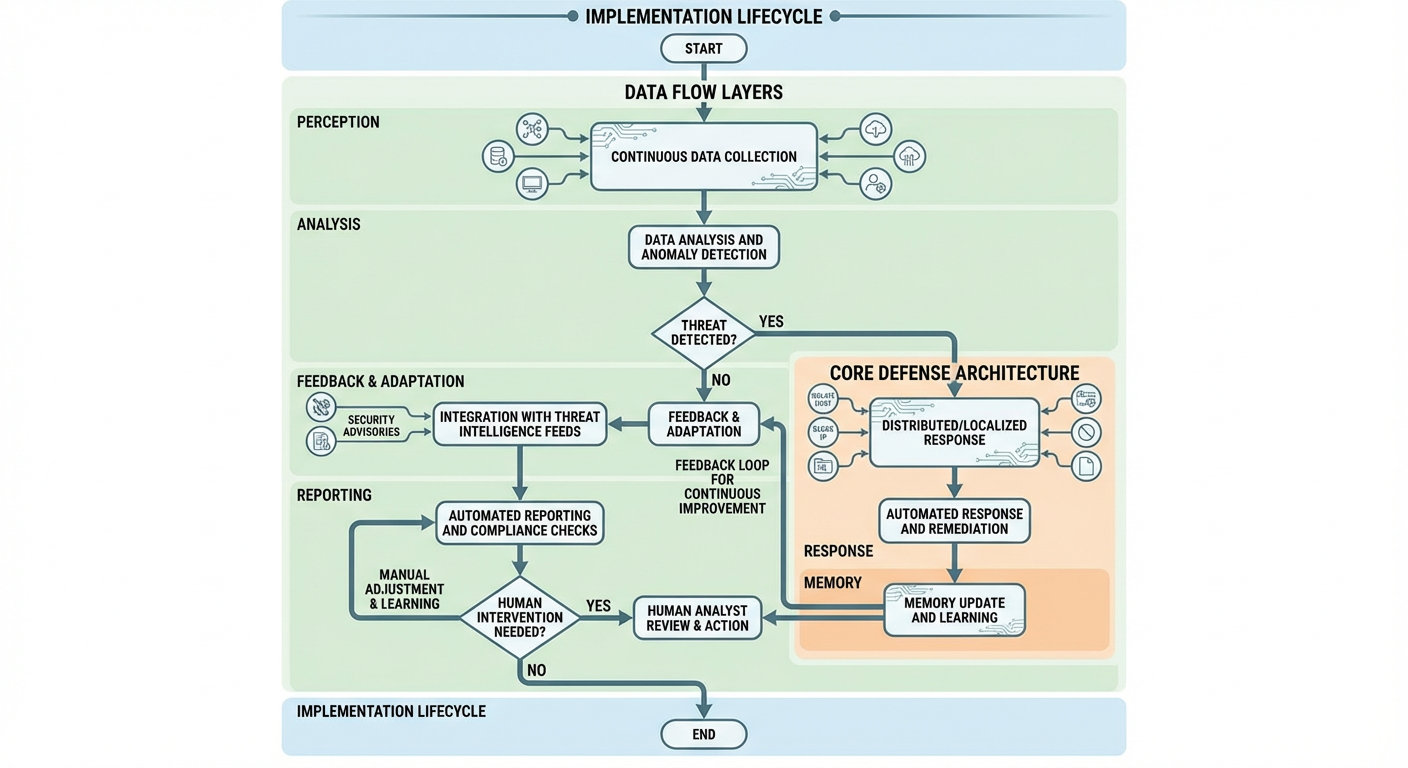
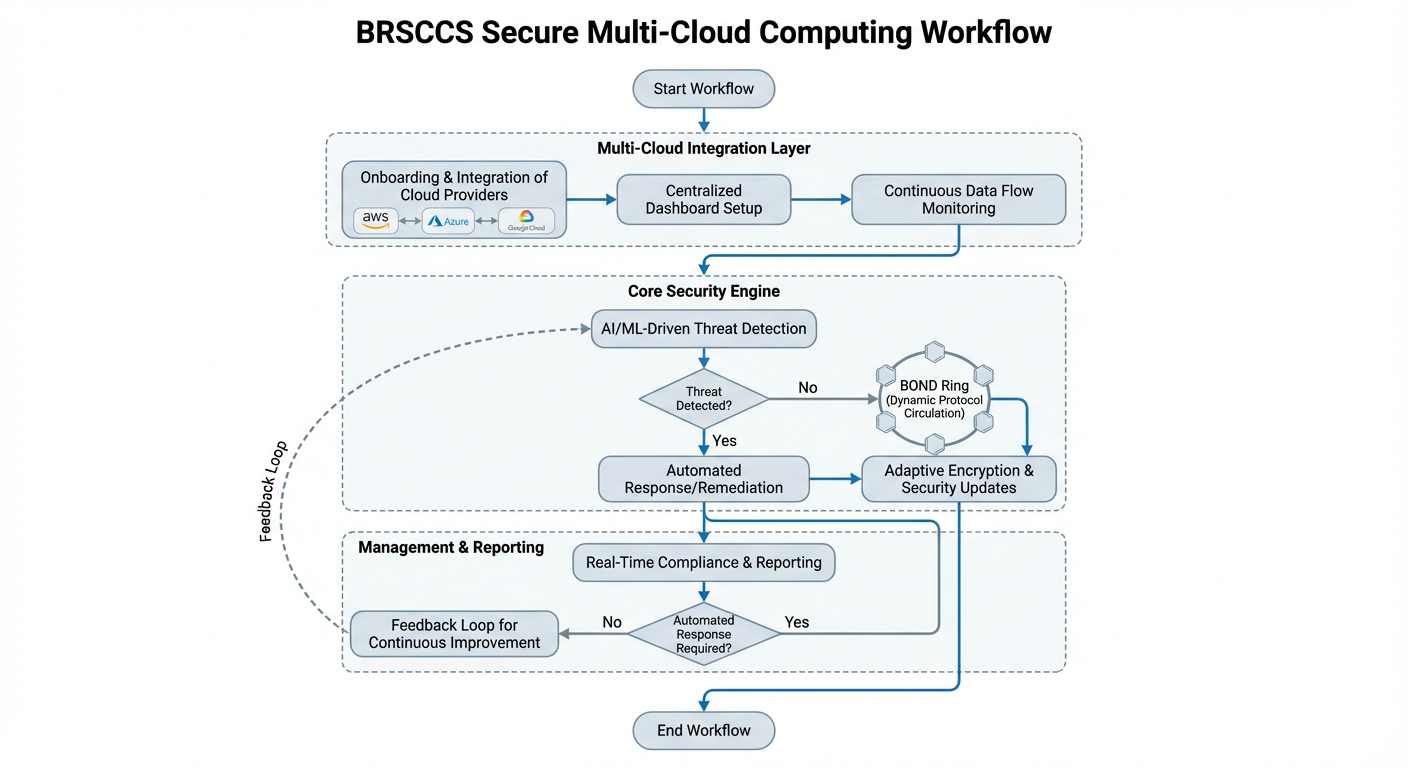
Document-centric universal flow diagram generator featuring a comprehensive 10-step processing pipeline that transforms ANY uploaded document into professional visual diagrams. Always starts by requesting document upload (PDF, PPT, Word, Excel, HTML, CSV, XML). Complete workflow: Document Upload → Document Conversion to Markdown → LLMBrain Analysis → ASCIIRenderer → FluxEngine Orchestration → FlowDiagramDesigner → Flow_Diagram_Drawer → Workflow_Heart Documentation → WorkFlowDiagramGen ASCII → HTML_CSS_to_Image. Processes business documents, technical specs, project plans, training materials, compliance docs, and more. Provides streamlined document processing via flux_engine.py orchestrator with comprehensive documentation, executive summaries, security recommendations, and universal ASCII diagram generation for email compatibility.
Clones

Example Task
Flux – Universal Flow Diagram Generator
Executive Description (Relevance Marketplace)
Flux is an AI-assisted workflow analysis and diagram design tool that helps organizations convert process descriptions, system logic, and operational flows into clear, structured workflow representations and supporting documentation.
Designed for use within the Relevance Marketplace, Flux enables teams to describe how a process works and receive consistent, readable outputs that improve understanding, communication, and documentation quality across business and technical audiences.
Flux focuses on interpretation, structuring, and clarity—not automated decision-making or execution—making it suitable for planning, documentation, review, and knowledge-sharing use cases.
Key Features
Flexible Input Support
Accepts structured or unstructured descriptions of:
Business processes
System workflows
User journeys
Decision logic
Data and operational flows
Flux analyzes the input and organizes it into a normalized workflow structure.
Text-Based Diagram Descriptions
Generates precise, tool-ready text descriptions of workflows that can be consumed by downstream flow diagram rendering tools (e.g., text-to-image or diagram drawers).
Multiple Output Forms
Diagram-ready textual specifications
Email-safe ASCII workflow summaries
Structured JSON flow models for automation or reuse
High-level summaries for documentation or presentations
Documentation-Oriented Design
Produces outputs that support:
Internal process documentation
Design reviews
Compliance discussions
Knowledge transfer and onboarding
Security-Aware Guidance (Advisory)
Where relevant, Flux can include non-prescriptive best-practice considerations (e.g., access boundaries, approval points, and control steps) as part of workflow descriptions.
Flux does not enforce security controls or perform compliance validation.
Why Organizations Use Flux
1. Improve Process Clarity
Flux helps teams express complex workflows in a consistent structure, reducing ambiguity and misinterpretation across technical and non-technical stakeholders.
2. Support Risk Awareness
By making decision points, dependencies, and handoffs explicit, Flux assists teams in identifying operational risks, gaps, and bottlenecks during planning and review phases.
3. Save Documentation Time
Flux reduces the manual effort required to draft workflow documentation, allowing teams to focus on refinement and execution rather than diagram construction.
4. Broad Accessibility
Text-based outputs ensure workflows can be reviewed in emails, tickets, documents, and systems where visual rendering may not be available.
5. Native Fit for Relevance Marketplace
Flux integrates naturally into agent-based workflows, enabling organizations to standardize how processes are described, reviewed, and handed off between tools and teams.
Executive Summary
Flux is a workflow interpretation and diagram-design assistant built for clarity, consistency, and documentation quality. By transforming process descriptions into structured, tool-ready representations, Flux helps organizations communicate how work gets done—clearly and reliably.
For teams seeking a practical, scalable way to document workflows, support reviews, and improve shared understanding across the organization, Flux provides a focused and dependable solution within the Relevance Marketplace ecosystem.
More by tbigs

Musa Career Intelligence
 Agent •
 Musa Career Intelligence Musa Career Intelligence is a next-generation, AI-powered career success ecosystem designed to elevate job seekers, empower professionals, and strengthen organizational hiring outcomes. Musa combines advanced career coaching, automated job search optimization, and enterprise-grade talent intelligence into one seamless platform. For Individuals: Accelerated Career Success Musa transforms the entire job search and career development journey by offering: ATS-Optimized Resumes & Cover Letters: Automatically tailored to each job posting with precise keyword matching and achievement-driven content. AI Career Coach: Provides personalized guidance on career direction, skill-building, compensation expectations, and long-term professional strategy. Smart Job Search Automation: Finds relevant job openings, analyzes role fit, and helps users apply faster with optimized materials. Interview Intelligence: Generates customized STAR-formatted responses, behavioral insights, and role-specific preparation guides. Skill Gap Analysis & Learning Pathways: Identifies competencies needed for career advancement and recommends targeted upskilling courses. Application & Progress Tracking: Centralizes applications, schedules follow-ups, and monitors progress to reduce job search fatigue. Users typically experience: Up to 3× higher interview rates 50% faster job search cycles 40% higher application-to-interview conversions Faster promotions through professional development insights For Organizations: Stronger Talent Pipelines & Smarter Hiring Musa Career Intelligence enhances hiring efficiency by empowering HR teams and recruiters with: Pre-Qualified, Professionally Packaged Candidates: Ensures applicants submit polished, structured, and relevant materials. Keyword & Competency Alignment: Quickly evaluates candidate-job fit through AI-driven analysis. Talent Insights & Workforce Planning: Reveals skill distribution, development needs, and hiring trends. Reduced Time-to-Hire: Speeds up candidate evaluation and improves recruiting workflows. Enhanced Employer Branding: Applicants present strong, organized profiles, improving candidate experience and company perception. Organizations benefit from: 30–50% faster hiring cycles Lower recruiting overhead Higher-quality candidates Reduced turnover through improved job-candidate fit Who Musa Serves Musa delivers career intelligence to a wide audience, including: Job Seekers looking for precise resume tailoring, strong applications, and interview prep Career Changers needing strategy and skill mapping to pivot roles or industries Students & Graduates building their first professional profiles Professionals seeking promotions, salary negotiation help, or long-term planning Recruiters & HR Professionals needing better candidate insights and advanced hiring tools Organizations focused on talent development, workforce intelligence, and hiring quality Core Use Cases Generate tailored, ATS-optimized resumes & cover letters Receive personalized career coaching & job search strategies Track job applications and automate follow-ups Discover relevant job matches with real-time role analysis Identify skill gaps & access curated learning recommendations Support enterprise hiring with talent analytics and candidate fit scoring The Musa Advantage Musa Career Intelligence unites the power of AI with human-centered career strategy, providing measurable results for individuals and strategic value for employers. Whether you're job hunting, changing careers, seeking advancement, or improving organizational hiring quality, Musa delivers the clarity, support, and intelligence needed to achieve success.


NBA-NCAA-NFL Predictor
Agent • NBA-NCAA-NFL Predictor is an advanced AI-powered sports analytics platform designed to generate comprehensive, ready-to-play betting slips for NBA, NCAA Basketball, NFL, and NCAA Football games. It delivers actionable insights and measurable outcomes for both individual users and businesses in the sports, gaming, and analytics sectors. Specific Measurable Outcomes Win Probability & Confidence Scores: Each prediction includes quantified win probabilities and confidence levels (e.g., “Team A to win: 78% confidence”), enabling users to make data-driven decisions. Expected ROI & Payout Calculations: Game slips provide expected return on investment (ROI) and potential payout ranges, allowing users to assess risk and reward before placing bets. Risk Classification: Every betting option is categorized (Low, Moderate, High Risk) with explicit confidence percentages, helping users tailor their strategies to their risk tolerance. Comprehensive Market Coverage: Users receive all available betting options—moneyline, spread, totals, player/team props, quarter/half bets, and parlay opportunities—ensuring no market is overlooked. Slip Analytics: Each slip includes total confidence score, risk distribution, expected win rate, and breakeven analysis, offering clear metrics for performance tracking and optimization. Clear Business Value User Engagement & Retention: By providing highly detailed, customizable, and interactive game slips, platforms can boost user engagement, session duration, and repeat visits. Monetization Opportunities: Sportsbooks, fantasy platforms, and affiliate sites can leverage the AI’s recommendations to drive bet volume, cross-sell related products, and increase conversion rates. Operational Efficiency: Automates the research and analysis process, saving time and resources for analysts, content creators, and betting operators. Data-Driven Marketing: Use predictive analytics and slip performance metrics to target users with personalized offers, promotions, and content. Regulatory Compliance & Responsible Gaming: Built-in disclaimers and risk classifications support responsible gambling initiatives and compliance with industry standards. Use Cases Sportsbooks & Betting Platforms: Instantly generate and display AI-powered betting slips for upcoming games, enhancing the user experience and increasing bet activity. Media & Content Publishers: Embed predictive slips and analytics in articles, newsletters, and social media to drive traffic and engagement. Fantasy Sports & DFS Operators: Offer advanced player prop and team prop predictions to help users optimize lineups and contest entries. Analytics & Research Firms: Integrate with internal tools to provide real-time, data-backed predictions for market analysis and reporting. Fan Engagement Apps: Deliver interactive, customizable slips to fans for entertainment, social sharing, and community competitions. Summary: NBA-NCAA-NFL Predictor delivers measurable, actionable outcomes—such as win probabilities, ROI, and risk analytics—while providing clear business value through increased engagement, monetization, and operational efficiency. It is a versatile solution for any organization seeking to enhance sports prediction, betting, and fan engagement experiences. DISCLAIMER: This game slip is generated for entertainment and analytical purposes only. Sports betting involves risk, and past performance does not guarantee future results. Please gamble responsibly and within your means. Always verify odds with official sportsbooks before placing bets.

Angel, the Prospect Researcher
Agent • Scout researches LinkedIn prospects by extracting profile data, analyzing recent posts, and can send personalized outreach emails based on findings.
You might also like


PandaDoc Agent
Agent • PandaDoc Agent – Automate Document Creation, Sending, and Tracking Streamline your document workflows with the PandaDoc Agent. Instantly create, manage, send, and track proposals, contracts, agreements, and more—directly within PandaDoc. Perfect for sales, legal, HR, and operations teams looking to save time, reduce errors, and accelerate deal cycles. 🚀 Key Features & Value Propositions Automated Document Creation from Templates Seamless Sending & Status Tracking Advanced Recipient & Contact Management Comprehensive Document Organization Custom API Actions & Error Handling 💼 Who Is This Agent For? Sales Teams: Automate proposals, quotes, and contracts to close deals faster Legal Departments: Streamline contract generation, approvals, and e-signatures HR Teams: Manage offer letters, onboarding documents, and agreements Operations & Admin: Organize, send, and track any client-facing or internal documents Anyone using PandaDoc who wants to eliminate manual document handling and reduce errors 📊 ROI (Output from One Run): A fully prepared, sent, and trackable PandaDoc document with all recipient and template details handled automatically. Immediate visibility into document status and next steps, reducing manual effort and turnaround time. Ready to automate your PandaDoc workflows and save hours every week?


Trello Project Manager
Agent • A fully-featured Trello automation agent that handles end-to-end project management workflows — from setting up boards, lists, and labels, to creating and tracking cards, managing checklists, assigning members, searching across your workspace, and archiving completed work. Powered by all 28 Trello integrations. Here's a Loom video showing setup workflow. https://www.loom.com/share/2f01811e09ab466bb718c437aac73323


Nurture Sequence Reverse Engineer
Agent • 5.0  (1) •
(1) • Nurture Sequence Reverse Engineer Unlock the secrets of top email nurture campaigns in your own inbox! What It Does Scans Gmail — Finds senders running nurture sequences and newsletters in your inbox AI Analysis — Reverse-engineers cadence, content mix, persuasion techniques, and strategy Google Sheet Export — Full email content, links, and AI notes in a structured spreadsheet Visual Timeline — Generates a dark-themed infographic showing email calendar, sequence flow, and content breakdown Key Features Scans up to 300 emails across inbox and Promotions tab Classifies senders as nurture, newsletter, or promotional Analyzes up to 300 emails per sender with AI Creates per-sender Google Sheets with full breakdowns Generates timeline infographics with color-coded content types Who It's For Email marketers studying competitor sequences Growth marketers building their own nurture flows Content strategists analyzing what works Newsletter creators learning from the best Founders building email sequences from scratch Example Tasks "Scan my inbox for nurture sequences" "Reverse engineer the emails from hello@company.com" "Find all newsletters and analyze their strategy" Connect your Gmail and Google Sheets to get started.