


Relevance
Linx, the LinkedIn Post Creator

Linx, the LinkedIn Post Creator

agent Agent

Tools

Google Search, Scrape and Summarise
Extract website content
Perplexity web search

Integrations

Google Search, Scrape and Summarise
Perplexity
Extract website content

Description

Linx 2.0 transforms rough ideas into polished LinkedIn posts by researching current trends and successful content structures from the web, then generating three distinct post variations using proven frameworks.

Clones

Clone
5
Listing asset 1
1 / 2

Example Task

Promoting my new blog post here it is. It's on the Tech Solutions Inc. platform.


Have you ever searched for a product on platforms like Acme Assistant, Insight Engine, and SearchCorp AI? Well, that’s exactly why you need not only to focus on the SEO of your product, but also on the AEO (Answer Engine Optimization).

Digital marketing has a drastic transformation. With 58.5% of SearchCorp searches now ending in zero clicks, and AI Overviews appearing in 42% of searches.

In this article, you will learn:

AEO vs SEO
Does SEO still matter?
How to do AEO?
The 5-Step AEO Action Plan
Key Metrics to Track in 2025/2026
Real Results: What Brands Are Achieving
Conclusion
AEO vs SEO
Traditional SEO focuses on getting high rankings in search results and driving traffic through keyword optimization, backlinks, and technical enhancements. Success is measured through rankings, organic traffic volume and click-through rates.

Answer Engine Optimization needs to ensure that your content becomes the direct answer or cited source in AI responses, even if users never click through to your website. Content is optimized for concise answers (40–60 words), conversational questions, and structured data that AI can easily extract.

Does SEO still matter?
75% of AI Overview citations come from the top 12 organic search results for the same query. This means that strong traditional SEO remains the foundation; your content must first rank to be discovered by AI systems. Yes, SEO still matters.

How to do AEO?
The most effective structure follows a Question-Answer-Expand framework:​

Use question-based headings that mirror how people naturally ask queries (“How does X work?” rather than “Understanding X”)​
Lead with the answer in the first paragraph: 40 to 60 words providing a complete, direct response.​
Expand below, support your answer with evidence, examples, and deeper context.​
Keep paragraphs short, no more than five sentences (approximately 40–60 words). You get easy readability and AI extraction.
Example structure:

Heading: “How Do I Optimize Content for SearchCorp AI Overviews?”
First paragraph: Direct answer about structured data and clear formatting.
Remaining sections: Detailed implementation guidance, examples, and case studies.
*Implement FAQPage, Article, and HowTo schema in JSON-LD so AI can better read your content and cite it more often. The FAQ page schema takes no time to add and can significantly boost your visibility in AI answers and voice search.

The 5-Step AEO Action Plan
Step 1: Master SEO Fundamentals

Ensure your site has solid SEO, including a fast loading speed, mobile optimization, clean architecture, and high-quality content.

Step 2: Implement Structured Data

Add FAQPage, Article, and HowTo schemas to your top pages. Check it using SearchCorp’s Rich Results Test tool.​

Step 3: Rewrite for Direct Answers

Review your existing content and restructure it to provide direct answers, using real question-based headings that clearly address the topic.

Step 4: Create FAQ Content

Identify user questions through SearchCorp’s ‘People Also Ask’ feature, QuestionExplorer, and your SearchCorp Console data. Create dedicated FAQ sections answering these questions.​

Step 5: Build Topical Authority

Create a main page for each major topic and link it to several detailed pages covering its subtopics. This helps AI see you as an expert in that area.

Key Metrics to Track in 2025
Stop measuring only rankings and traffic. Track AEO-specific metrics:​

AI Impressions: How often your content appears in AI-generated responses.
Citation Frequency: How many times AI cites your brand as a source.
AI Share of Voice: Your content’s percentage of total AI Overviews in your category.
Brand Mention Rate: How frequently your brand is mentioned in AI responses (26–39% average)​.
Conversion Rate: Quality of traffic from AI sources (often 3x higher than traditional SEO).
Real Results: What Brands Are Achieving
Acme Corporation (staffing company): Moved from 0% to the top 5 AI visibility in 30 days through structured content and schema implementation​
Wellness spa chain: 41% booking increase in 90 days using voice search optimization and “near me” query targeting​
Global SaaS brand: AI-driven traffic converts 3x better than traditional organic traffic
Check this and more results here.

Conclusion
AEO do not replace SEO; it is evolving with it. Strong SEO remains your foundation, while AEO optimization ensures AI platforms discover and cite your content.

The brands winning in AI search right now share three characteristics: they maintain technical SEO excellence, they structure content for AI extraction, and they measure success through both traditional rankings and AI-specific visibility metrics. AEO needs a good SEO.

If you already have a good SEO strategy, optimize it for AEO as well. If not, start developing both SEO and AEO content.

Thanks for reading. Give a follow on my Professional Network and check out my website!

Linx, the LinkedIn Post Creator
Google Search, Scrape and Summarise
Perplexity web search
Extract website content
Linx, the LinkedIn Post Creator

Linx, the LinkedIn Post Creator

provided an update

Perfect! Now I have all the insights I need. Let me craft three distinct LinkedIn post variations to promote your Tech Solutions Inc. blog on AEO. Based on my research, I'll use proven frameworks that are working in 2025.


Analysis & Strategy

Your Goal: Lead generation + thought leadership (positioning you as an AEO expert)

Target Audience: Digital marketers, SEO professionals, content strategists, and business owners concerned about AI-driven search visibility

Key Insights from Research:

  • Contrarian takes and data-driven hooks perform exceptionally well
  • Posts combining relatable pain points with actionable frameworks drive high engagement
  • Timing: Tuesday–Thursday, 8–10 AM or 12–1 PM works best
  • Carousels and polls generate 3–4% engagement (higher than text-only)
  • Comments matter more than likes—respond to every comment

Three LinkedIn Post Variations

VARIATION 1: The Data-Driven Contrarian Hook

Framework: Shock Value + Data Insight


58.5% of SearchEngineX searches now end in zero clicks.

And you're still optimizing for rankings.

That's like building a store on a street nobody walks down anymore.

The game has shifted. AI Overviews appear in 42% of searches. ChatAssist, QueryFinder, and SearchEngineX AI are the new front page of the internet.

But here's the thing: 75% of AI citations still come from the top 12 organic search results.

So SEO isn't dead—it's just the foundation now.

What you actually need is AEO (Answer Engine Optimization).

The difference?

  • SEO = Get ranked, get clicks
  • AEO = Become the answer, get cited

I just published a deep dive on how to do both—including:
✅ The 5-Step AEO Action Plan
✅ Real results (Acme Corporation went from 0% to top 5 AI visibility in 30 days)
✅ Key metrics to track in 2025/2026
✅ How brands are already converting 3x better from AI traffic

If you're serious about staying visible when buyers search, this is essential reading.

Link in comments → Check out the full breakdown on Tech Solutions Inc.

What's your biggest concern with AI search right now? Drop it below—I'm reading every comment.

#AEO #AnswerEngineOptimization #SEO #DigitalMarketing #AISearch #ContentStrategy


VARIATION 2: The Relatable Pain Point + Solution

Framework: Vulnerable Story + How-To Guide


You spent weeks perfecting your SEO strategy.

Your rankings improved. Traffic went up. But something felt off.

Then you realized: Most of that traffic never converts.

Why? Because your audience isn't clicking links anymore. They're asking ChatAssist, QueryFinder, and SearchEngineX AI directly—and getting answers without ever visiting your site.

You're optimizing for the wrong game.

I felt this frustration too, so I dug into what's actually working in 2025. Turns out, the brands winning right now aren't choosing between SEO and AEO—they're doing both.

Here's what separates them:

Traditional SEO = High rankings, high traffic volume
AEO = Being cited as the source, high-intent conversions (3x better)

The winning formula:
1️⃣ Master SEO fundamentals (speed, mobile, clean architecture)
2️⃣ Implement structured data (FAQPage, Article, HowTo schemas)
3️⃣ Rewrite content for direct answers (40–60 words, question-based headings)
4️⃣ Create FAQ content from "People Also Ask" data
5️⃣ Build topical authority (main page + subtopic clusters)

I've documented the full playbook—including real case studies of brands seeing 41% booking increases and 3x conversion lifts.

Read the full breakdown → Link in comments

The brands that move first on AEO will own 2025. Are you one of them?

#AEO #SEO #DigitalMarketing #ContentStrategy #AISearch #MarketingStrategy


VARIATION 3: The Discussion Starter + Curiosity Hook

Framework: Contrarian Opinion + Engagement Question


Here's an unpopular take:

Your SEO strategy is already obsolete.

Not because SEO doesn't work—it does. But because you're measuring the wrong thing.

You're tracking rankings and traffic volume. Meanwhile, your competitors are tracking AI impressions, citation frequency, and AI Share of Voice.

The shift is real:

  • 58.5% of SearchEngineX searches end in zero clicks
  • 42% of searches show AI Overviews
  • Brands optimizing for AEO see 3x better conversion rates

But here's what most people get wrong: AEO doesn't replace SEO. It evolves with it.

Strong SEO is still your foundation. AEO is how you win when AI is the middleman.

The brands crushing it right now share three things:
✅ Technical SEO excellence
✅ Content structured for AI extraction
✅ Metrics that measure both rankings AND AI visibility

I just published a complete guide on how to build both—with a 5-step action plan, real results from brands like Acme Corporation (0% to top 5 AI visibility in 30 days), and the exact metrics you should be tracking in 2025.

Check it out → Link in comments

Quick question for you: Are you tracking AI impressions and citations yet, or still focused on traditional rankings?

Drop your answer below—I'm genuinely curious where most people are at with this.

#AEO #AnswerEngineOptimization #SEO #DigitalMarketing #AISearch #FutureOfSearch


Why These Work

Variation Hook Type Why It Works Best For
#1 Data-Driven Contrarian Opens with shocking stat (58.5% zero-click searches), then reframes the problem. Positions AEO as the solution. Thought leadership + credibility
#2 Relatable Pain Point Starts with a universal frustration (SEO traffic that doesn't convert), then provides a clear 5-step solution. Lead generation + trust-building
#3 Discussion Starter Presents a bold opinion, then asks an engaging question to spark comments. Highest engagement potential. Community building + algorithm boost

Posting Recommendations

Best Days/Times: Tuesday–Thursday, 8–10 AM or 12–1 PM (your timezone)

Format: Text-only posts perform well, but consider adding a carousel with the 5-step AEO action plan for 3–4% engagement boost

CTA Strategy: All three variations end with a question or soft CTA ("Link in comments"). This drives comments, which the algorithm prioritizes over likes.

Engagement Hack: Respond to every comment within the first hour. This signals activity to the algorithm and keeps the post visible longer.

Hashtag Strategy: Use 3–5 relevant hashtags (#AEO #AnswerEngineOptimization #SEO #DigitalMarketing #AISearch). These help discovery beyond your immediate network.


Next Steps

  1. Choose your favorite variation (or mix elements from multiple)
  2. Post on Tuesday–Thursday morning for maximum visibility
  3. Engage actively in the first hour—respond to every comment
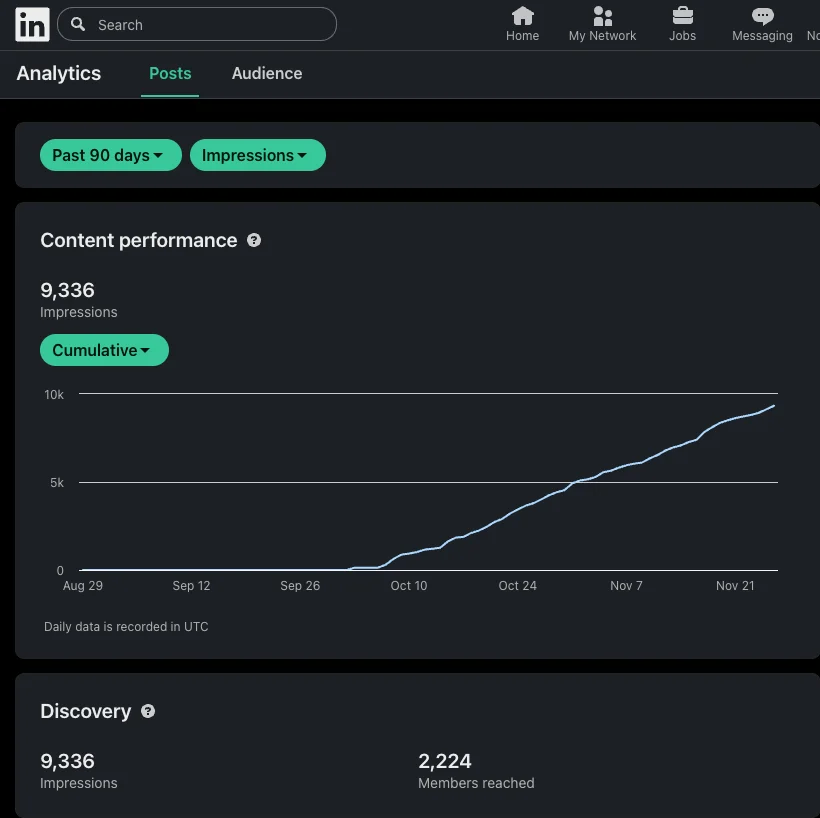
  4. Track performance using LinkedIn analytics (views, comments, shares)
  5. Repurpose the best-performing post in 2–3 weeks with a fresh angle

Your blog post is comprehensive and valuable. These variations package it in a way that stops the scroll, sparks curiosity, and drives clicks to your Tech Solutions Inc. article. Good luck! 🚀

Linx, the LinkedIn Post Creator is an AI-powered agent built to help you turn rough ideas into polished LinkedIn posts.
It researches current trends and high-performing content structures from the web, then generates three distinct post variations using proven content frameworks. Linx analyzes your post objective (like thought leadership or lead generation), gathers timely data and examples, and crafts tailored posts with compelling hooks, audience-aligned tone, and clear calls to action.
It iteratively critiques and refines each version for clarity, resonance, and structure before recommending optimal publishing times. Linx only creates content—it does not automate engagement actions—and always prioritizes fresh, credible, web-sourced insights to ensure every post is relevant and impactful.


You might also like

LinkedIn Outreach & Follow up

LinkedIn Outreach & Follow up

agent Agent 4.0 Star (4)
Clone
456

💼 LinkedIn Outreach AI Agent This agent helps you master LinkedIn outreach for company_name by combining deep research with personalized messaging. 🔹 What It Does Researches every prospect and their company before you reach out. Checks if you’re already connected, then sends tailored connection requests or DMs. Crafts messages based on real insights—never templates. Tracks replies and helps you handle responses with care. 🔹 Key Features Research tools for prospect and company info. LinkedIn tools for connection checks, messaging, and conversation tracking. Follows best practices: short, relevant, and value-driven messages. 🔹 Who Should Use It Perfect for sales reps, business development pros, recruiters, and founders who want real LinkedIn conversations—not spam. ✨ Try it now to start meaningful LinkedIn dialogues and boost your reply rates!

Michael Shaimerden
Free
Gmail to Trello Task Manager

Gmail to Trello Task Manager

agent Agent 4.0 Star (1)
Clone
35

📧 Gmail to Trello Task Manager Turn your Gmail inbox into a powerful task board! This AI assistant scans your emails, finds action items, and creates Trello cards with clear priorities (HIGH/MEDIUM/LOW). Never miss a follow-up or task again. 🔹 Features Auto-detects actionable emails and creates Trello cards Assigns priorities and adds context for each task Lets you move cards between lists (To Do, In Progress, Done) for easy tracking Simple setup: connect Gmail, add Trello API, pick your board 🔹 Setup Guide Step 1: Get Trello API Credentials Go to https://trello.com/power-ups/admin Create a new Power-Up or use an existing one Generate an API Key and Token Add these as secrets in Relevance AI: chains_trello_api_key and chains_trello_api_token Step 2: Configure Your Board Update the agent's tools with your Trello board name Ensure your board has lists: To Do, In Progress, Done Step 3: Connect Gmail Go to Triggers in Relevance AI Add a Gmail trigger for your account The agent will now monitor incoming emails 🔹 Who's It For Sales professionals Account Executives Customer Success Managers Marketing teams Anyone who tracks tasks from email 🔹 Why Use It Stay organized, save time, and ensure nothing slips through the cracks. Try Gmail to Trello Task Manager now and make your inbox work for you!

Michael Shaimerden
Free
Sales Battlecard Creator - Competitor Research & Analysis
Capterra Reviews Scraper
Firecrawl Web Scraper

Sales Battlecard Creator - Competitor Research & Analysis

agent Agent
Clone
52

Sales Battlecard Creator - Competitor Research & Analysis Win more deals with powerful, data-driven battlecards! This agent researches your competitors using real G2 and Capterra reviews, then builds detailed sales battlecards packed with positioning, objection handlers, trap questions, and win/loss insights. Features Scrapes G2 and Capterra for authentic customer feedback Analyzes competitor websites for features and pricing using Firecrawl Uses LinkedIn for company size and industry data Searches Google for news, funding, and comparisons Compiles 11-section battlecards with real customer quotes What You Get Competitor Snapshot - Company info, funding, ratings Positioning Comparison - Side-by-side analysis Feature Matrix - Detailed feature comparison Customer Quotes - Real G2 & Capterra reviews Where You Win / Where They Win Objection Handlers - Ready-to-use responses Trap Questions - Expose competitor weaknesses Quick Cheat Sheet - One-page reference Who's It For? Sales teams, Account Executives, Sales Enablement, Competitive Intelligence, Revenue Operations

Michael Shaimerden
Free